Why a user would choose ClearCard
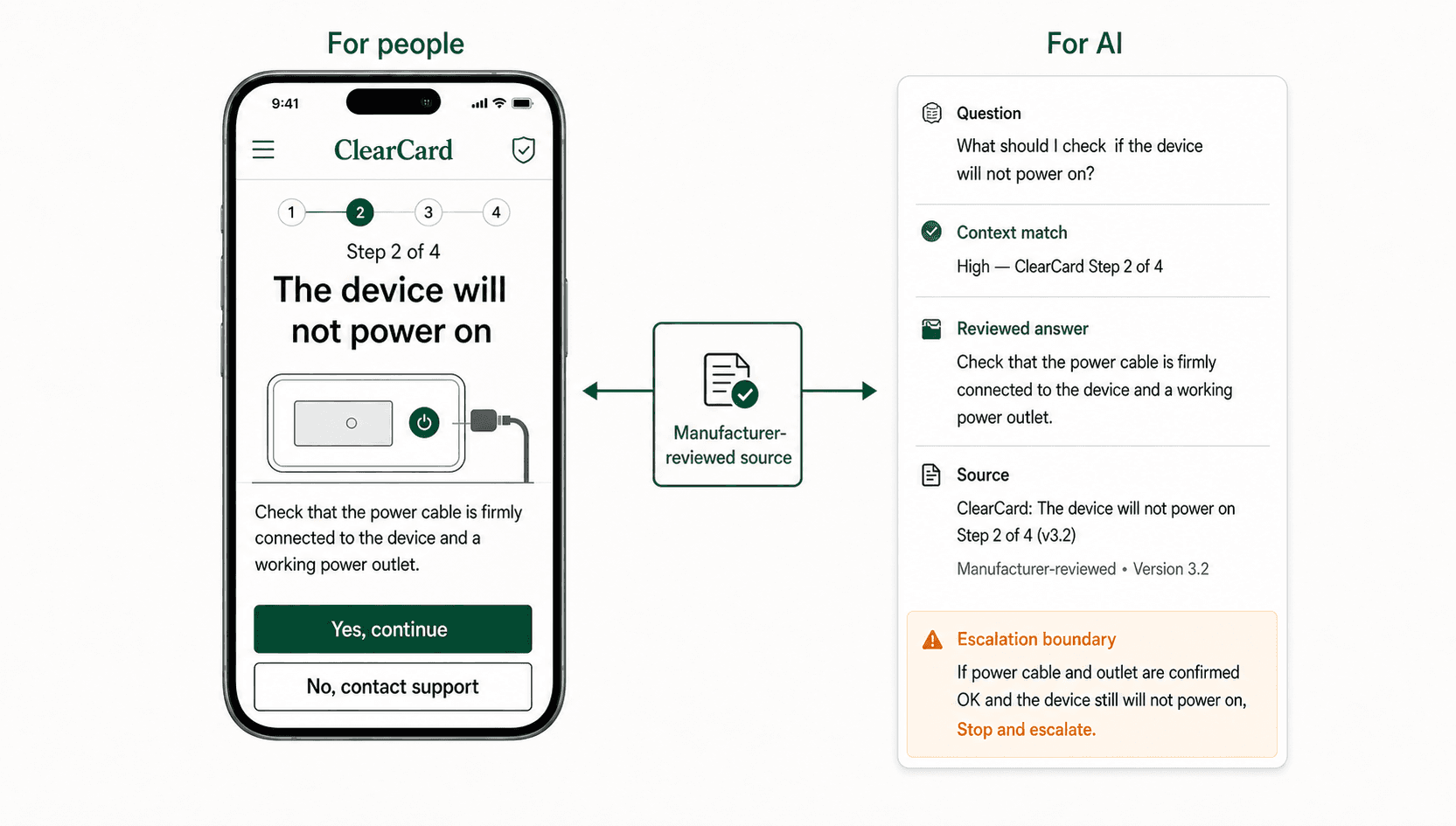
A user with a device problem wants the next useful step, not a reading assignment. On a phone, the user can ask by voice, type a question, or provide a permitted photo, then compare one large static image with the device in front of them.
Each screen asks for one judgment or one action. The user can look at the image, look at the device, act, and continue. There is no long document to search and no video timeline to scrub backward and forward.
That simplicity is what makes the support journey usable. When users choose the reviewed path, their permitted questions and troubleshooting interactions can become visible to the manufacturer.
What the manufacturer can finally see
A physical store may know what was purchased while much of the shopper's journey remains invisible. An online store can see the search, the product page, the images viewed, the return visits, and whether the journey was completed.
Traditional medical-device manuals and videos create a similar blind spot. The manufacturer publishes the material but usually cannot see the user's exact question, which instruction was opened, where uncertainty began, or whether the answer worked.
ClearCard makes that support journey observable within the manufacturer's privacy, consent, and retention rules.
| The manufacturer can see | Why it matters earlier |
|---|---|
| The user's real question, including questions nobody anticipated | The support library can grow from actual demand instead of internal assumptions alone. |
| Which visual path and cards the user opened | The team can see which guidance people actually use at the device. |
| Which step was repeated, skipped, or abandoned | Confusing or incomplete support can be reviewed before the same pattern spreads. |
| Whether the user reported the visible problem resolved | The company can compare published support with real user-reported outcomes. |
| Whether a stop warning appeared and human support was reached | A failed stop or failed handoff can be identified for earlier review. |
Put the guardrail inside the real journey
A warning can exist inside a PDF and still be missed. The manufacturer cannot assume that a stressed user found the right page, recognized the warning, or understood when to stop.
ClearCard gives the manufacturer control over the visual journey: what appears on each image, the order of the images, how many decisions or actions the user takes, where a warning appears, and where self-guided troubleshooting ends.
When the user reaches a manufacturer-defined safety, quality, version, or uncertainty boundary, the relevant guardrail can appear directly in the sequence. The path can stop further self-help and direct the user to the approved human-support route.
This increases the likelihood that the warning is seen at the moment it matters. It also creates an earlier opportunity for human intervention before the potential problem develops further.
Passive support and proactive support create different visibility
| Passive PDF or video support | Proactive ClearCard support journey |
|---|---|
| The user must find the relevant page or video moment. | The user follows one large visual judgment or action at a time. |
| The manufacturer cannot usually see the question or reading path. | The manufacturer can see the question, cards viewed, stopping point, and user-reported result. |
| A warning may remain buried in a long document. | A guardrail can appear inside the relevant sequence and stop further self-help. |
| The company often learns about the path after a call, escalation, or later event. | The company has an earlier opportunity to understand the journey and transfer the user to human support. |
What earlier visibility gives the manufacturer
- Support can begin with the path already attempted instead of asking the user to reconstruct the entire story.
- Training can focus on questions and steps that real users repeatedly need.
- Engineering and human-factors teams can see where users hesitate, repeat, or abandon a path.
- Qualified quality, complaint-intake, clinical, legal, or Regulatory Affairs / Quality Assurance owners can receive earlier review inputs when the manufacturer routes them there.
- Leadership can compare support coverage with real user demand and decide what should improve next.
Source ledger
What it can tell you
FDA describes instructions, labeling, and training material as parts of the medical-device user interface and explains that human-factors work aims to minimize use-related risk.
What it cannot decide
Whether a specific ClearCard path, warning, or handoff is adequate for a particular device, user, use environment, or risk.
What it can tell you
FDA explains that users' health, emotional state, environment, perception, decisions, and interaction with instructions can affect device use.
What it cannot decide
How any one manufacturer should design, validate, or approve its device-support journey.
What it can tell you
FDA lists confusing or inadequate labeling, unanticipated use, and device use that requires physical, perceptual, or cognitive abilities beyond the user among circumstances that can contribute to medical-device use errors.
What it cannot decide
Whether a user question, viewed card, unresolved path, support interaction, or observed pattern is a complaint or reportable event.
What it can tell you
The current ClearCard service definition: easy visual support, observable user journeys, manufacturer-defined boundaries, and human-support handoff.
What it cannot decide
A professional safety, quality, complaint, reporting, recall, labeling, clinical, or regulatory conclusion for a manufacturer.
Frequently asked questions
Why would a medical-device user choose ClearCard over a PDF manual?
ClearCard is designed around the immediate problem. The user can ask by voice or text, provide a permitted photo where available, and follow large static images one judgment or action at a time while looking at the device.
What can a manufacturer learn from the ClearCard support journey?
Within its privacy and retention rules, the manufacturer can see what users asked, which reviewed paths and cards they opened, where they repeated or stopped, whether they reported the problem resolved, and whether human support was reached.
How can ClearCard make a support guardrail more visible?
The manufacturer can place the warning inside the relevant visual sequence, define the point where self-guided troubleshooting stops, and direct the user to an approved human-support route at that moment.
Does ClearCard prevent complaints, Warning Letters, or recalls?
ClearCard makes no prevention promise. It gives the manufacturer earlier visibility into the user's real troubleshooting journey and increases the opportunity to show a guardrail and involve human support before a potential problem develops further.
Does ClearCard decide whether a user interaction is a complaint?
No. ClearCard records questions, viewed guidance, user-reported outcomes, stops, and handoffs. The manufacturer's qualified owners decide whether any observation belongs in complaint handling, quality, regulatory, clinical, legal, training, engineering, or support processes.
Where should one of your device-support journeys stop?
Bring one product and one repeated user problem. Scope an easier visual path, the questions and steps your team needs to see, and the point where the user should move to human support.
Reader feedback
Useful pages should feed the next topic choices. Leave a signal or a short comment.